Avoid Downtime: Modbus RTU vs TCP for Control Engineers
Reliability first comparison of Modbus RTU and TCP for control engineers. Learn failure modes, wiring and VLAN pitfalls, security steps, and an 8-step...

Pick RTU for small, legacy serial buses where deterministic timing and simple wiring matter more than throughput. Pick TCP when you need multiple masters, higher data volume, or integration with SCADA, MES, or cloud dashboards. The Modbus application layer is identical in both, so gateways bridge them without much drama, but TCP demands real network security since it rides on plant Ethernet.
TL;DR:
- Modbus RTU is ideal for small serial networks with limited device counts and deterministic polling, typically up to 32 devices over RS-485 or RS-232.
- Modbus TCP suits larger, scalable networks requiring multiple concurrent clients, faster throughput, and integration with Ethernet-based systems like SCADA or cloud dashboards.
- RTU frames are lightweight with CRC error checking, whereas TCP frames use a header with device mapping, leveraging TCP/IP stack for error control and supporting multiple master connections.
- RTU's physical constraints include limited range and physical wiring issues, while TCP relies on network infrastructure, VLANs, and firewall rules for security and performance.
- Combining RTU and TCP via gateways preserves legacy hardware while enabling Ethernet connectivity, but gateways introduce a critical point of failure that must be reliably monitored.
Table of Contents
- Modbus TCP vs RTU: The Quick Technical Comparison
- How Modbus RTU and TCP Frames Actually Differ
- Throughput, Latency, and Determinism: What the Numbers Mean
- What Actually Breaks and How You Catch It
- Wiring, Termination, and VLANs: Getting the Physical Layer Right
- A Step-by-Step Checklist for Choosing RTU, TCP, or a Gateway
- Bridging RTU and TCP Without Creating a New Weak Point
- The First Checks That Solve Most Modbus Problems
- How a No-Code SCADA Platform Simplifies Modbus Integration
- What Twenty Years of Field Deployments Teach You About Migration
- See Modbus Data Come to Life in a 3D Digital Twin
- Sources
- FAQ
Modbus TCP vs RTU: The Quick Technical Comparison
Both variants speak the same function codes and register logic, so the differences that matter live entirely in the transport layer. Here's how they stack up on the attributes that actually drive design decisions.
| Attribute | Modbus RTU | Modbus TCP |
|---|---|---|
| Physical medium / topology | RS-485/RS-232, daisy-chain multidrop | Ethernet, star topology via switches |
| Frame overhead | Compact binary frame plus CRC-16 | 7-byte MBAP header plus PDU |
| Error checking | CRC-16 checksum | Handled by TCP/IP stack |
| Typical speed | Up to 115200 bps | 10/100 Mbps |
| Max nodes / scalability | Around 32 devices per segment | Effectively unlimited via switching |
| Typical range | Up to roughly 1.2 km depending on baud | 100 m copper, extended via switches or fiber |
| Concurrency / masters | Single master per bus | Multiple concurrent clients |
| Common failure modes | Termination, bias, EMI on cabling | Half-open sockets, switch/VLAN issues |
The takeaway for design purposes: RTU's single-master model keeps polling predictable, but it caps how many clients can talk to a device at once. TCP's multiple simultaneous clients support means your SCADA, historian, and a maintenance laptop can all query the same PLC without contention. The tradeoff shows up in the failure-mode column, which we unpack later.
How Modbus RTU and TCP Frames Actually Differ
Modbus's staying power comes from a simple design choice: the application layer stays constant whether the transport underneath is a serial cable or an Ethernet switch. Function codes for reading coils, writing registers, or requesting diagnostics work identically on both. What changes is how each variant wraps that payload for delivery.
RTU frames are lean by necessity. A frame contains the slave address, function code, data payload, and a CRC-16 checksum for error detection. Devices know a frame has ended not by a delimiter character but by silence: 3.5 character times of no activity on the bus signals the end of transmission. It's an elegant solution for a half-duplex serial line with no built-in framing.
TCP framing works differently because Ethernet and TCP already guarantee delivery and integrity. Instead of a CRC, Modbus TCP adds a 7-byte MBAP header carrying:
- A transaction identifier that lets clients match responses to requests
- A protocol identifier (always zero for Modbus)
- A length field describing the remaining bytes
- A unit identifier that plays the same role RTU's slave address does
That unit identifier is the hinge point for bridging. A gateway can map several serial slave addresses to unit IDs behind one IP address, letting a single Ethernet connection represent an entire RTU segment.
Throughput, Latency, and Determinism: What the Numbers Mean
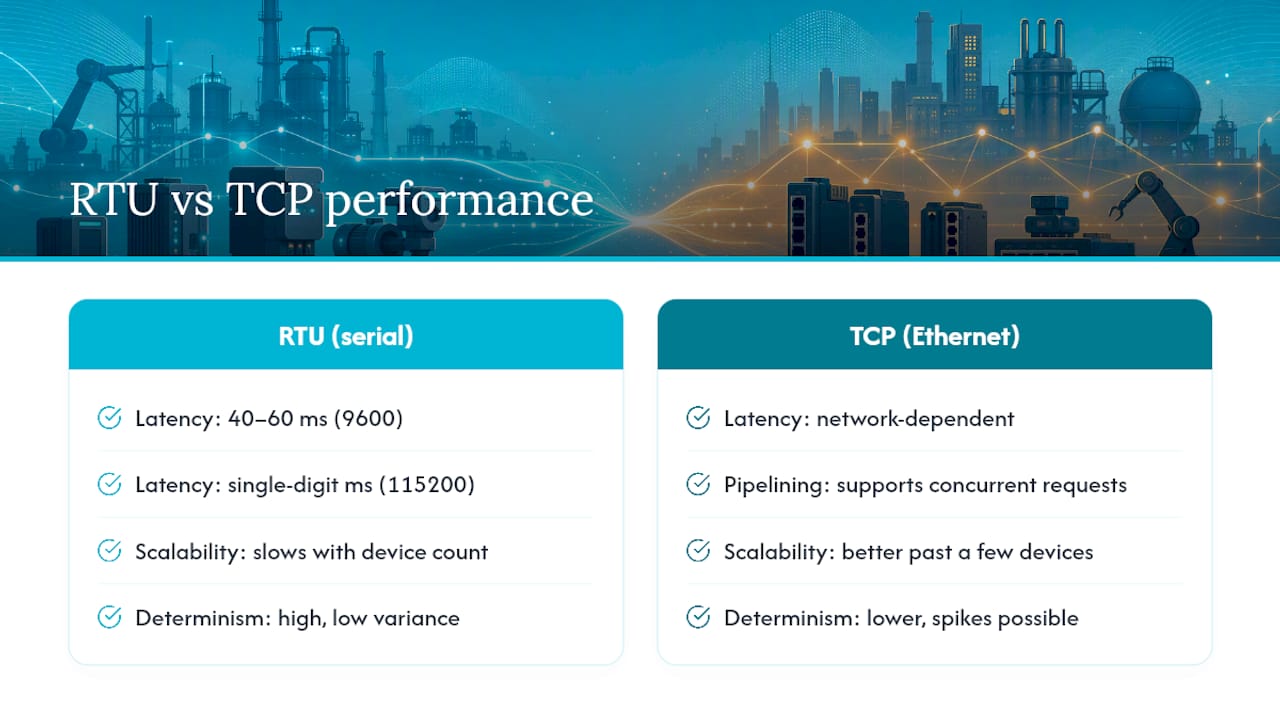
Baud rate on an RTU bus sets a hard ceiling on how fast you can poll. At 9600 baud, a typical register read/write exchange might take 40 to 60 milliseconds once you factor in turnaround delays; bump that to 115200 baud and the same exchange often drops to single-digit milliseconds. Multiply that per-device time by device count and you get your aggregate scan cycle. Add ten devices at a sluggish baud rate, and your update rate can crawl into the seconds.
TCP flips the tradeoff. Individual transaction latency depends on network conditions rather than a shared serial channel, and the transaction identifier field allows a client to pipeline several requests without waiting for each response before sending the next. That means average throughput on TCP usually beats RTU by a wide margin once you have more than a handful of devices.
The catch is determinism. RTU's worst-case latency is nearly identical to its average case, because one master polls one device at a time in a fixed order. TCP's average latency is lower, but a switch buffering packets during a broadcast storm can spike a single transaction's response time unpredictably. For a fast PID loop, that variance matters. For polling a historian every few seconds, it does not.
What Actually Breaks and How You Catch It
RTU and TCP fail in almost opposite ways, and that difference should shape how you instrument each network.
RTU failures tend to announce themselves. A missing termination resistor, an unbiased pair, or EMI from a nearby motor drive shows up as rising CRC error counts and timeouts almost immediately. The physical layer is simple enough that troubleshooting usually starts and ends with a multimeter and an oscilloscope.
TCP failures are quieter. A half-open socket left by a crashed client, a switch reboot mid-transaction, or transient network congestion can degrade performance without tripping a hard error. Because degradation often stays inside your configured timeout window, nothing alarms unless you're actively trending latency over time.
Security exposure is the other split. RTU's isolated serial bus has essentially no network attack surface. TCP rides on shared plant Ethernet, so it inherits every risk that comes with IP networking. Mitigate with VLAN isolation for Modbus traffic, firewall rules restricting port 502 to known hosts, VPNs for remote access, and Modbus Security/TLS extensions where your devices support them.
Track these signals on any live network:
- CRC error counts and retry rates on RTU segments
- Timeout frequency per device, trended weekly, not just alarmed instantly
- Round-trip latency drift on TCP connections
- Socket state counts (especially half-open connections) on gateways and PLCs
Pro Tip: Log your baseline latency and error rate in the first week after commissioning. Without a healthy baseline, you can't tell degraded from normal six months later.
Wiring, Termination, and VLANs: Getting the Physical Layer Right
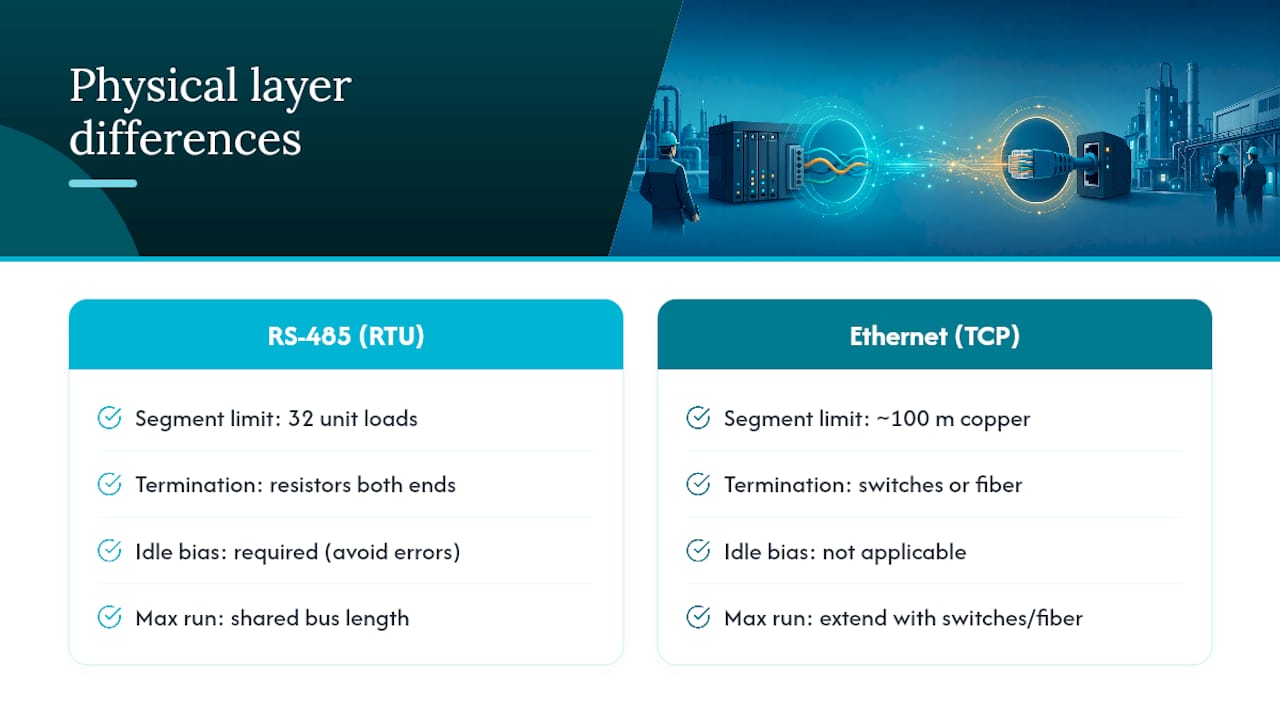
RS-485 segments have real, physical limits. Standard practice caps a segment at 32 unit loads unless you're using repeaters, with termination resistors at both physical ends of the bus and a bias network to hold idle lines at a known state. Skip termination or bias and you'll see intermittent errors that look random but trace back to reflections on the line every time.
Ethernet brings its own constraints. Copper runs are capped around 100 meters per segment; beyond that, you need a switch or a jump to fiber. For Modbus TCP specifically, isolating device traffic on its own VLAN keeps broadcast storms from unrelated IT traffic away from your control network, and it simplifies firewall rules since you're filtering a known subnet rather than the whole plant floor.
On addressing: RTU's single-master limit means any second client needs either a shared serial-to-serial multiplexer or, more commonly, a gateway that exposes the bus as Modbus TCP. Ethernet infrastructure costs more upfront in switches and cabling but pays it back in flexibility once you need more than one client talking to the same devices.
A Step-by-Step Checklist for Choosing RTU, TCP, or a Gateway
Run through this before specifying a new network segment or retrofitting an old one:
- Inventory device capability. Confirm whether existing field devices support native Modbus TCP, RTU only, or both.
- Check existing wiring. If RS-485 cabling is already in place and working reliably, ripping it out rarely pays for itself.
- Define required poll rates. Fast control loops favor RTU's deterministic timing; slower monitoring tolerates TCP's variance.
- Count required clients. More than one system needing simultaneous access points strongly toward TCP or a gateway.
- Measure distance and node count. Long runs or high device counts favor Ethernet's scalability.
- Set your security posture. If TCP is chosen, plan VLAN segmentation and firewall rules from day one, not as an afterthought.
- Budget realistically. RTU wiring is cheaper per point; Ethernet infrastructure costs more but scales better across a facility.
- Weigh migration risk. If devices are RTU-only and budgets are tight, a gateway is usually the lowest-risk path forward.
As a rule of thumb: fewer than a dozen legacy devices on one bus with a single supervisory client, stick with RTU. Growing device counts, multiple client systems, or plans to integrate with SCADA and cloud reporting, move to TCP. Mixed environments, especially where legacy hardware can't be swapped out on a reasonable budget, call for a gateway.
Bridging RTU and TCP Without Creating a New Weak Point
Serial-to-Ethernet gateways are the workhorse of real-world Modbus integration. A gateway polls RTU slaves over RS-485, maps each slave address to a unit identifier, and either repackages the data into proper MBAP/TCP frames or tunnels the raw RTU frame inside a TCP socket, an approach often called RTU-over-TCP. The two are not interchangeable: a client expecting native Modbus TCP framing won't parse a tunneled RTU frame correctly, so confirm which mode your gateway and client software actually support before deployment.
Gateways insulate field wiring from network-side faults, but they're also a new single point of failure. Most engineer-facing guides treat a hybrid architecture as the standard for facilities with heavy legacy investment, since it protects the RTU segment while unlocking supervisory integration on the Ethernet side.
The First Checks That Solve Most Modbus Problems
Most Modbus incidents trace back to a handful of overlooked basics, and checking them first saves hours of deeper debugging.
For RTU: verify termination resistors are present at both bus ends, confirm bias is applied, check that baud rate and parity match across every device on the segment, and make sure no two devices share a unit address. Then check CRC error counters. A climbing count almost always points to a physical-layer problem.
For TCP: confirm the client can reach port 502 on the target device, check firewall and VLAN rules aren't silently dropping packets, and watch for lingering half-open sockets on the gateway or PLC. Set timeouts conservatively rather than aggressively tight, since a timeout set too short will misread normal network jitter as a device failure.
- Log CRC and timeout counts continuously, not just at commissioning
- Trend TCP latency weekly to catch slow degradation before it becomes an outage
- Document your topology, including baud rates and unit ID assignments, every time something changes
Pro Tip: Keep a single spreadsheet mapping every device's unit ID, IP or serial address, and baud/parity settings. Half of "mystery" Modbus outages are just two devices sharing an address that nobody documented.
How a No-Code SCADA Platform Simplifies Modbus Integration
Once you've settled on RTU, TCP, or a hybrid gateway setup, the next challenge is turning raw registers into something operators can actually use. Kingfisher's browser-based 3D SCADA platform includes Modbus drivers alongside support for other industrial protocols, so mapping registers to a visual interface doesn't require custom scripting.
Drag-and-drop modeling and a marketplace of prebuilt 3D and 2D components can mean a tank, pump, or conveyor doesn't need to be modeled from scratch. Point the platform at your device registers, drop in a matching component, and bind the data visually.
A practical implementation checklist looks like this: confirm which driver mode matches your device (RTU or TCP), map unit IDs or IP addresses to the components you're building, set polling intervals appropriate to your network type, and stage the configuration in a test environment before pushing it to a live dashboard.
What Twenty Years of Field Deployments Teach You About Migration
Leave RTU in place when it's working. Ripping out a functioning serial bus to chase a modern architecture is a common and expensive mistake. Migration earns its cost when you add clients, need faster aggregate polling, or want cloud visibility that a single serial master can't provide.
A common hybrid scenario: a water treatment plant with fifteen-year-old RTU flow meters that still perform fine, bridged through a gateway so the SCADA layer sees clean Modbus TCP. Nobody touches the field wiring, and nobody waits on a slow serial poll for a dashboard refresh.
If you go TCP, segment it and watch it. A network you can't see into is worse than a serial bus you understand.
— Jeffrey Anastacia
See Modbus Data Come to Life in a 3D Digital Twin
Reading a register value in a text log tells you a pump is running. Seeing that same value drive a spinning 3D model on a browser dashboard tells your whole team what's actually happening on the floor, without a single line of script. No-code 3D SCADA platforms can connect directly to Modbus RTU and TCP devices and turn raw data into a visual, interactive digital twin operators can read at a glance.

Because the platform runs in a browser, there's no heavy client software to install across a plant's workstations, and the component marketplace means you're assembling proven pumps, valves, and tanks rather than modeling geometry by hand. It fits best when you already have working Modbus infrastructure and want faster visualization, cross-system dashboards, or mobile access without rebuilding your SCADA from the ground up.
If your current setup already handles the transport layer well and the gap is really on the visualization side, take a look at the Kingfisher 3D SCADA platform and its solution pages to see whether a rapid, no-code digital twin makes sense for your next project.
Sources
The Modbus Organization's official specification is the definitive source for frame structure, function codes, and MBAP header details. Field-tested comparisons of reliability and latency tradeoffs, frame-level differences, and hybrid deployment patterns round out the practical guidance engineers need beyond the spec itself.
- MODBUS Protocol Specification (Modbus Organization)
- Modbus TCP vs Modbus RTU: Reliability, Latency, and Failure Modes (FlowFuse)
- Modbus RTU vs Modbus TCP/IP — Frame Structure and Key Differences (SCADA Protocols)
- Modbus RTU vs Modbus TCP Compared | SURIOTA
FAQ
Is Modbus TCP the Same as Modbus RTU?
No. They share the same application-layer function codes and register model, but RTU uses serial transport with CRC-16 error checking while TCP uses Ethernet with an MBAP header and relies on the TCP stack for error checking.
Is Modbus RTU the Same as RS-485?
Not exactly. RS-485 is the physical layer (the wiring and electrical signaling) that Modbus RTU most commonly runs on, though RTU can also run over RS-232 for point-to-point links.
What Is Modbus TCP Used For?
Modbus TCP connects industrial devices like PLCs, sensors, and meters over Ethernet, typically on TCP port 502, so SCADA systems, historians, and platforms like Kingfisher's 3D SCADA can poll multiple devices simultaneously for real-time monitoring.
Is Modbus TCP the Same as TCP/IP?
No. TCP/IP is the general internet transport protocol suite. Modbus TCP is an application-layer protocol that runs on top of standard TCP/IP, adding the Modbus-specific MBAP header and function codes to the data TCP/IP carries.