Deploy MQTT SCADA With Sparkplug B: 6 Steps Engineers Can Use
An implementation guide for automation engineers to deploy MQTT SCADA with Sparkplug B, DMZ broker placement, security checks, and no code 3D HMI binding.
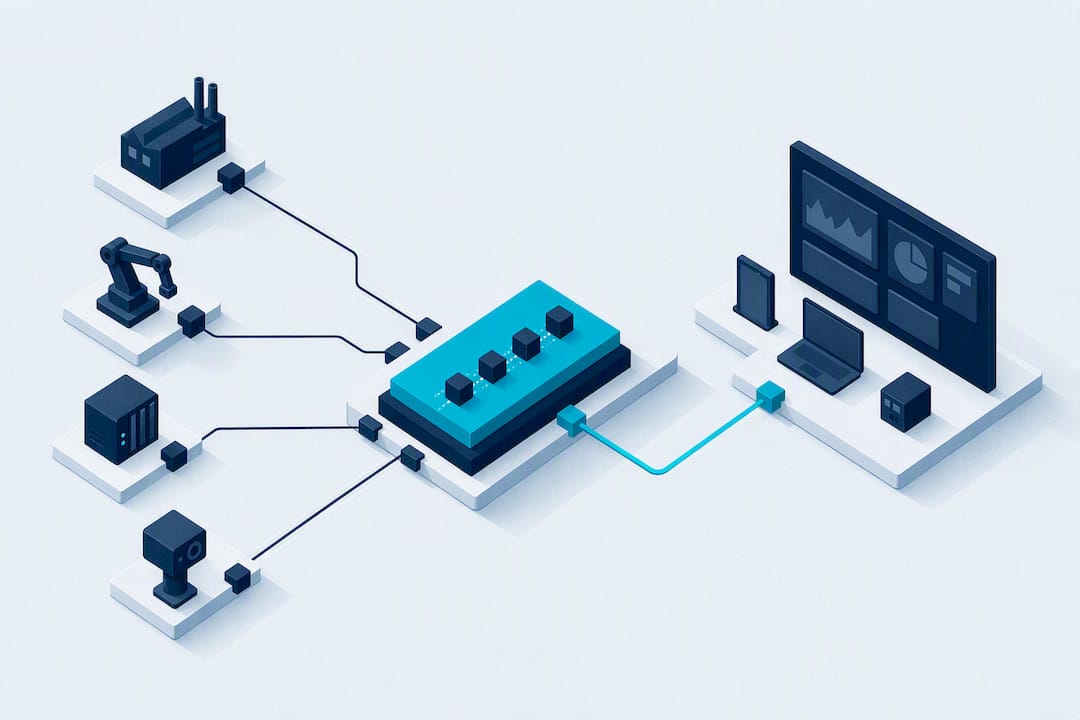
For most Unified Namespace SCADA projects, the right stack is MQTT with Sparkplug B, a broker sitting in the DMZ, and SCADA acting as a subscriber rather than a server. That combination gives you decoupled, state aware telemetry that scales across plants without rewriting drivers for every new consumer. A platform like Kingfisher 3D SCADA can bind those MQTT topics directly to visual assets, which shortens the path from tag to dashboard.
TL;DR:
- Using MQTT with Sparkplug B and placing the broker in a DMZ allows for scalable, decoupled telemetry with minimal impact on field devices.
- Proper broker placement, TLS security, and lifecycle testing are critical to prevent ghost tags, dropped connections, and security vulnerabilities.
- MQTT v3.1.1 remains suitable for legacy systems, while v5.0 offers advanced features for greenfield projects; always validate NDEATH behavior before deployment.
- Kingfisher 3D SCADA simplifies visualization by enabling drag-and-drop MQTT topic binding and offers a large marketplace for asset modeling.
- Integrating legacy systems requires protocol gateways that publish data on change instead of fixed polling, and careful cleanup of old tag naming conventions.
Table of Contents
- Why MQTT Fits Modern SCADA Better Than Point-to-Point Polling
- Unified Namespace and Sparkplug B: What the Spec Actually Solves
- Broker Placement and Selection: Where MQTT SCADA Integration Lives or Dies
- Step-By-Step: Configuring MQTT for SCADA Integration
- Security and Reliability Practices That Actually Get Enforced
- How Kingfisher 3D SCADA Fits Into an MQTT-Based Architecture
- Handling Legacy SCADA Systems Integration With MQTT
- Monitoring and Diagnostics for MQTT-Based SCADA Systems
- Author Perspective: Common Pitfalls and Realistic Tradeoffs
- Put This Architecture to Work Without the Custom HMI Build
- Sources
Why MQTT Fits Modern SCADA Better Than Point-to-Point Polling
MQTT decouples publishers from subscribers. A PLC publishes a value once, and every interested system, a historian, a dashboard, a cloud connector, gets it without the PLC knowing or caring who's listening. That's a fundamental shift from the request/response polling that traditional SCADA drivers rely on, where each new consumer means another connection back to the field device.
The practical payoff shows up in three places:
- Bandwidth: MQTT sends data only on change (report-by-exception), not on a polling cycle, which matters enormously over cellular or satellite links to remote sites.
- Firewall friendliness: MQTT clients initiate outbound connections, so you rarely need to open inbound ports into your OT network.
- Scalability: adding a new subscriber (a new dashboard, a new analytics tool) requires zero changes to the field device or its logic.
Compared to OPC UA, which excels at rich, self-describing data models and complex method calls, MQTT wins on lightweight telemetry at scale. REST APIs work fine for occasional queries but choke under high-frequency streaming. If you're building a Unified Namespace across dozens of sites, MQTT is the better default. For a single machine talking to one HMI, plain OPC UA might be simpler. On version choice: MQTT v3.1.1 remains the safe bet for brownfield gateways with older firmware, while v5.0's reason codes and shared subscriptions are worth targeting on new, greenfield builds.
Unified Namespace and Sparkplug B: What the Spec Actually Solves
A Unified Namespace (UNS) is a single, hierarchical data structure that every system in a plant, and across plants, publishes to and subscribes from. Without one, every integration is a custom point-to-point job. With one, adding a new consumer is a subscription, not a project.
Sparkplug B is the specification that makes UNS practical on top of MQTT. It defines strict topic namespaces (spBv1.0/group_id/message_type/edge_node_id/device_id), encodes payloads in protobuf instead of verbose JSON, and standardizes lifecycle messages. That combination reduces manual tag configuration and improves interoperability across vendors and systems.
The lifecycle piece matters most in production:
- NBIRTH messages announce a node coming online along with its full metric set, so subscribers auto-discover tags instead of requiring manual mapping.
- NDEATH messages fire when a node disconnects, telling every subscriber that data is now stale rather than letting a dashboard silently show a frozen last value as if it were live.
That birth/death pattern is what prevents what engineers call ghost tags, values that look current but are actually hours old because the source went offline without anyone noticing.
Pro Tip: Test your NDEATH behavior deliberately before go-live. Pull the network cable on a gateway and time how long it takes your SCADA to flag that tag as stale. If it doesn't flag at all, your Primary Host configuration is wrong.
Broker Placement and Selection: Where MQTT SCADA Integration Lives or Dies
Your broker is the single most consequential architecture decision in an MQTT SCADA integration project. Get placement wrong and you either expose your OT network or bottleneck every consumer behind a fragile link.
The pattern that holds up in practice: place the broker in a DMZ, and have SCADA initiate the outbound connection to it rather than accepting inbound traffic. This keeps the OT network isolated while still letting IT systems, cloud connectors, and mobile dashboards subscribe freely on the DMZ side.
When you're choosing a broker, require:
- Native Sparkplug B support, not a bolt-on plugin with partial compliance.
- TLS by default, with certificate-based client authentication available.
- Documented client connection limits and clustering options for growth.
An embedded broker inside a single SCADA package is fine for a pilot or a single-site deployment, but it becomes a liability the moment you need clustering or multi-site failover. For anything beyond a handful of sites, Mosquitto covers small to mid-size deployments well, while clustered enterprise brokers make more sense once you're pushing thousands of concurrent clients or need geographic redundancy.
Step-By-Step: Configuring MQTT for SCADA Integration
Follow this order and you'll catch configuration mistakes before they hit production, not after.
- Inventory your tags first. Decide which ones justify full Sparkplug B lifecycle management and which are simple enough for raw JSON. Mixing both on one broker instance without segmentation risks parsing failures.
- Configure the broker. Enable TLS on port 8883, generate client certificates, write ACLs scoping each client to its own topic branch, and set retain and will messages deliberately, not by default.
- Set up your Primary Host subscription. This is the SCADA side declaring itself the authoritative consumer of NBIRTH/NDEATH state.
- Configure the SCADA MQTT engine. Set keep-alive intervals realistically (30 to 60 seconds for most industrial links), decide on clean session versus persistent session based on whether you need message replay after reconnect, and map incoming topics to internal tags.
- Configure gateways or PLCs. For greenfield builds, choose PLCs or edge gateways with native Sparkplug B publishing. For retrofits, add a protocol gateway in front of legacy Modbus or serial devices rather than rewriting PLC logic.
- Validate before go-live. Force an NBIRTH and confirm auto-discovery works. Force an NDEATH and confirm tags go stale visibly. Check for ghost tags after a planned outage. Measure actual bandwidth and latency under realistic load, not just at idle.
Pro Tip: Run your validation tests with the broker's client list open in a second window. Watching connections drop and reconnect in real time catches ACL misconfigurations that a log file will bury.
Security and Reliability Practices That Actually Get Enforced
TLS on port 8883 is the floor, not the ceiling. Certificate validation should be mandatory, and for anything touching safety-critical processes, mutual TLS (mTLS) is worth the extra certificate management overhead.
Credentials alone are not access control. Pair them with ACLs scoped per client, so a dashboard subscriber can never accidentally publish, and a field gateway can only publish to its own topic branch. Plaintext username and password with no ACL behind it is a single point of failure waiting to be exploited.
On the network side, outbound-only connections from OT to a DMZ broker remain the standard pattern, with VPN tunnels as a fallback only where DMZ deployment genuinely isn't possible.
For reliability, three settings matter more than any others:
- Retain flags on status topics so new subscribers get last-known-state immediately, not a blank screen.
- Will messages configured per client so an ungraceful disconnect still triggers a death notification.
- Heartbeat intervals tuned tight enough to detect an outage in seconds, not minutes.
Segment Sparkplug traffic away from stray JSON publishers. Running both on one broker instance without separation is a common cause of dropped connections and silent parsing failures that only show up under load.
How Kingfisher 3D SCADA Fits Into an MQTT-Based Architecture
Once your MQTT topics and Sparkplug B lifecycle are solid, the remaining work is visualization, and that's where a lot of engineering time disappears into custom HMI scripting. Kingfisher 3D SCADA approaches that differently: it's a no-code, browser-based platform built to bind live telemetry to 3D scenes without writing display logic by hand.
What that changes in practice:
- Drag-and-drop binding connects an MQTT topic to a visual asset's color, position, or alarm state without scripting.
- A marketplace with over 1,000 ready-made components cuts modeling time for common industrial assets like tanks, pumps, and conveyors.
- AI-powered scene generation from existing schematics or photos gets you to a working digital twin faster than modeling from scratch.
Kingfisher's implementation for an airport digital twin shows this approach applied to large-scale facility monitoring, where the volume of assets makes manual HMI building impractical. If your integration is small and static, a custom HMI binding might still be simpler. Once you're managing hundreds of tags across a sprawling facility, a platform built for that scale earns its place.
Handling Legacy SCADA Systems Integration With MQTT
Most plants aren't starting from a clean slate. You've got PLCs from three different decades, a SCADA package that's been patched for fifteen years, and no appetite to rip any of it out. The good news: MQTT integration doesn't require replacing legacy control.
The standard approach is a protocol gateway sitting between the legacy fieldbus, Modbus RTU, Modbus TCP, or an old serial link, and your MQTT broker. The gateway polls the legacy device the way it always has, then republishes those values as MQTT topics, ideally formatted as Sparkplug B payloads so they get the same birth/death lifecycle treatment as newer, MQTT-native devices.
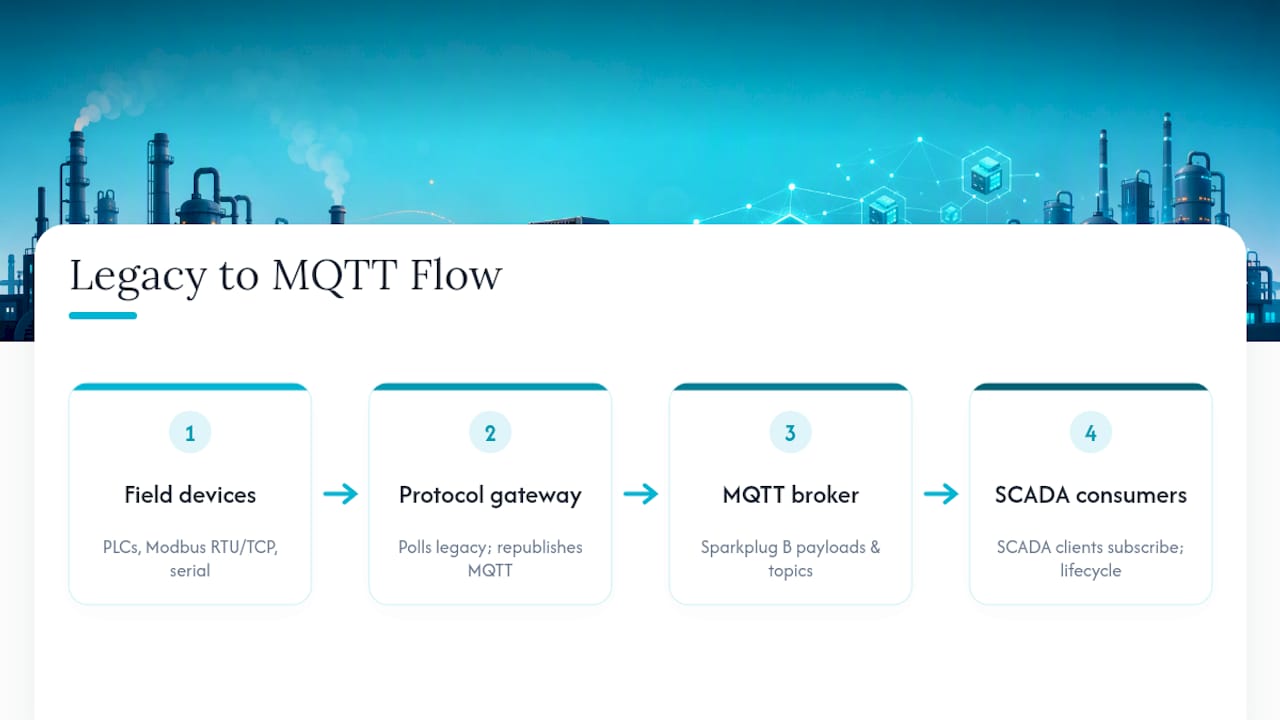
The mistake engineers make here is running the gateway with polling intervals inherited from the old SCADA system, often once every few seconds even for slow-changing values. MQTT's report-by-exception advantage disappears if the gateway is still polling on a fixed cycle instead of publishing on actual change. Reconfigure the polling logic where the gateway allows it.
Retrofit projects should also budget time for tag naming cleanup. Legacy systems tend to accumulate inconsistent, cryptic tag names over years of patchwork changes. Mapping those into a clean Sparkplug B namespace is a good forcing function to fix that debt rather than carrying it forward into your new UNS structure. Skip this step and you inherit the same mess in a shinier protocol.
Monitoring and Diagnostics for MQTT-Based SCADA Systems
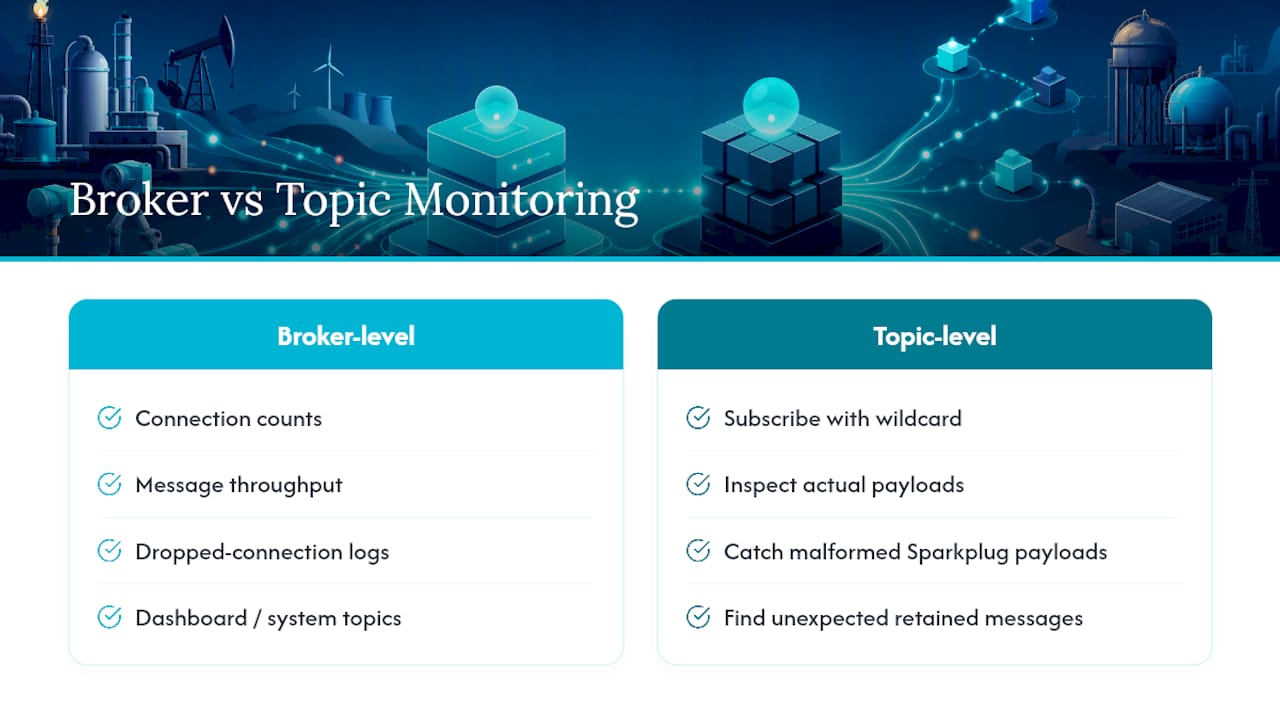
You can't troubleshoot what you can't see, and MQTT's decoupled nature means traditional network sniffing tells you less than it used to. The tools that matter here split into two categories: broker-level diagnostics and application-level topic inspection.
At the broker level, most production brokers expose connection counts, message throughput, and dropped-connection logs through a dashboard or system topics. Watching client connect and disconnect events in real time is the fastest way to catch a flapping gateway before it generates alarm noise downstream.
At the topic level, a general-purpose MQTT client tool lets you subscribe to a wildcard topic (spBv1.0/#) and watch the actual payload traffic flowing through your namespace. This is invaluable for catching malformed Sparkplug payloads, unexpected retained messages, or a device publishing to the wrong namespace branch entirely.
Bandwidth and latency monitoring deserve their own pass, separate from functional testing. A topic structure that works fine at ten devices can behave very differently at five hundred, particularly if retained messages are being reused inconsistently across the namespace. Build a habit of periodically auditing retained messages on your broker. Stale retained values on decommissioned devices are a quiet source of the same ghost-tag problem that NDEATH is supposed to solve, just at the broker level instead of the SCADA level.
Author Perspective: Common Pitfalls and Realistic Tradeoffs
The mistake I see most often isn't a protocol choice. It's running Sparkplug and raw JSON on the same broker without segmenting traffic, then wondering why connections drop under load. Segment it or run separate instances.
Ghost tags aren't an edge case, they're what happens by default if you skip lifecycle testing. Pull the cable, watch what happens, fix what breaks.
On procurement: ask vendors to demonstrate native Sparkplug B support during the proof of concept, not after the purchase order is signed. Partial compliance surfaces at the worst possible time.
— Jeffrey Anastacia
Put This Architecture to Work Without the Custom HMI Build
Getting the broker, Sparkplug B, and tag mapping right solves the data problem. Turning that data into something an operator actually wants to look at is a separate project, usually the slower one. Kingfisher closes that gap by letting you bind MQTT topics straight to a 3D scene through drag-and-drop, no scripting layer between your topic tree and your visualization.
Faster modeling comes from the component marketplace with over a thousand ready-made industrial assets, and the browser-based platform means your team accesses the same live twin from an engineering workstation or a tablet on the plant floor. If you're planning a UNS rollout and want your visualization layer built at the same pace as your data layer, start with the Kingfisher 3D SCADA platform and evaluate it against your current integration checklist.
Sources
- Integrating SCADA Systems into Unified Namespace
- Eclipse Mosquitto
- SCADA to Web: Configuring MQTT, REST, and JSON Export